Coming soon. Outpost Suite runs daily in our own four stores and is being prepared for general availability. Join the early interest list.

One login. One database. One place to manage it all.

Underneath the apps is a platform: single sign-on, a launcher that shows each person only what they're allowed to open, an admin Control Panel with a real audit log, and one shared database so your apps never need to be "integrated" with each other.
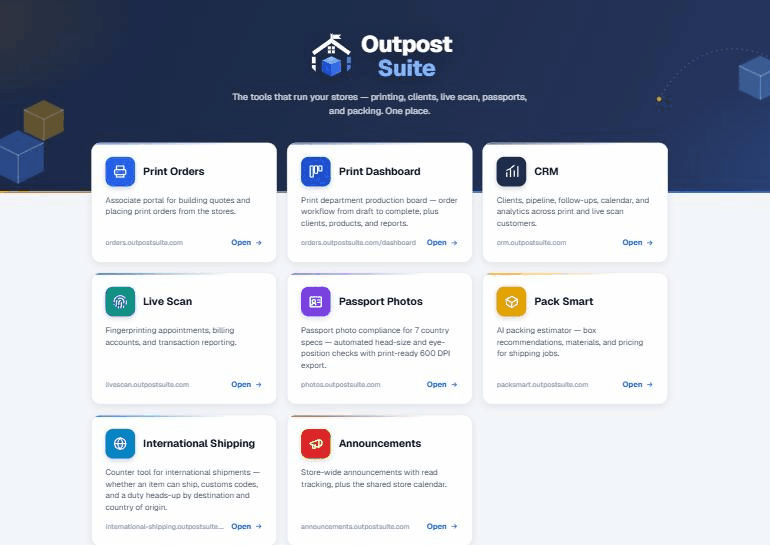
launcher.outpostsuite.com
The suite launcher with permission-filtered app tiles
What's inside

The boring parts, done properly.

SSO launcherSign in once at the launcher and the session carries across every app in the suite. No password sticky notes, no per-app accounts.
Permission-filtered tilesEach account sees only the apps it's been granted. A counter associate's launcher looks different from yours, automatically.
Admin Control PanelUsers, stores, apps, and a permissions editor in one place, plus an audit log that records every mutating action. Who changed what, and when, on the record.
Suite-wide app on/off switchTake any app offline for the whole suite with one toggle. Useful for maintenance, and for rollouts you're not ready to announce.
A shared design systemNavy and amber, tablet-first with 44px touch targets, and the same header and app switcher in every app. Learn one app, and you've half-learned the rest.
One shared Postgres databasePrint, CRM, and live scan read and write the same tables. That's why an order becomes CRM history instantly, with no sync jobs to babysit.
A dynamic app switcherThe switcher in every app's header picks up new apps automatically as they're granted. Add an app to the registry once, and it appears everywhere it should.
Why store owners care

Software sprawl is a tax. This is the refund.

See the whole suite from the admin chair.

We'll add a user, grant apps, flip a toggle, and read the audit log. Ten minutes of the unglamorous stuff that saves you hours.

Request a demo