Coming soon. Outpost Suite runs daily in our own four stores and is being prepared for general availability. Join the early interest list.

Any associate can quote a print job right. On their first day.

Print Orders is two apps in one. At the counter, guided order entry that prices every job from your own pricing engine. In the back room, a production dashboard that runs the job from draft to picked up, with the money tracked the whole way.

orders.outpostsuite.com
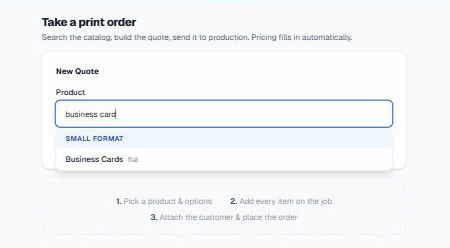
Associate order entry with catalog search and guided configuration
The associate app

Order entry that asks the right questions and does the math.

No price binder, no guessing, no calling the manager. The associate searches the catalog, answers the questions the product needs, and the price is already correct.

Searchable catalog, grouped by categoryEvery product you sell, organized the way your staff thinks about it. Type a few letters and pick.
Guided, question-by-question configurationThe form only asks what the product actually needs. Business cards ask about stock and sides. Banners ask about size. Nothing else appears.
Automatic pricing across six modelsFlat, each, tiered, per-square-foot, tiered-square-foot, and custom quote. The engine picks the right math for the product, every time.
Common-size shortcuts for postersOne tap for the sizes you sell daily, up to 36x48, with size limits enforced in plain language instead of a cryptic error.
Rush, setup, and finish add-onsA rush toggle applies your tier multiplier. Setup fee and rounded corners are one tap each, and they show up on the price immediately.
Custom quote path when the catalog can't answerOdd job? Take it anyway with a Pending price, or add manual custom items with your own description and amount.
Artwork attached on the spotUpload the customer's files right in the order, up to 40MB, multiple files per item. No thumb drives floating around the store.
Client search or inline creationReturning customer? Two keystrokes. New customer? Create them without leaving the order. Either way the CRM knows about it.
Delivery and payment, captured up frontPickup or ship for a flat $15 with address. Paid Now or Pay at Pickup. A due date on every order. Nothing left to memory.
Discounts with a paper trailPercentage or dollar discounts, a required reason, and a live savings readout so the customer sees exactly what they saved.
Accountability built inEvery order requires the associate's name, and prints a confirmation receipt the customer can walk away with.
The Store Orders tab runs the front counterAuto-refreshes every 30 seconds. Tap to call the customer. A Collect $X box that requires the payment-collected checkbox before completing, and one-tap Ready for Pickup and Picked Up buttons.
The production dashboard

The back room gets a command center.

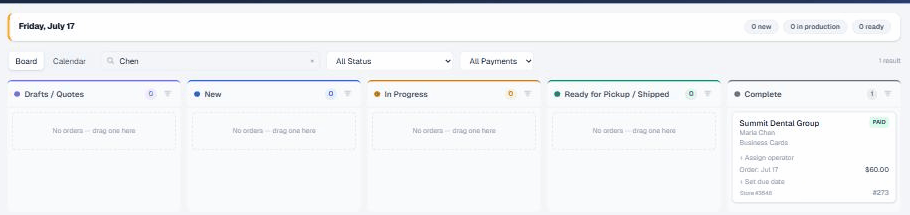
Every order taken at the counter lands here the same second. The print department opens to a morning briefing strip with the overdue count, what's due today, and clickable status pills that filter the board.

orders.outpostsuite.com/dashboard
Production board with morning briefing and five staged columns
A five-column drag board that can't be brokenDrag orders between stages, but only legal transitions are allowed, so nothing skips a step. Sort order is remembered per column, and each column pages independently so busy stages stay fast.
Calendar view with an unscheduled traySee the week's workload by due date, with unscheduled jobs held in a tray until someone commits to a day.
Order cards that tell the whole story at a glanceRUSH, QUOTE, SENT, APPROVED, PAID, and INVOICED badges, color-coded due-date chips, inline operator assignment, and a mini calendar for rescheduling without opening the order.
orders.outpostsuite.com/dashboard
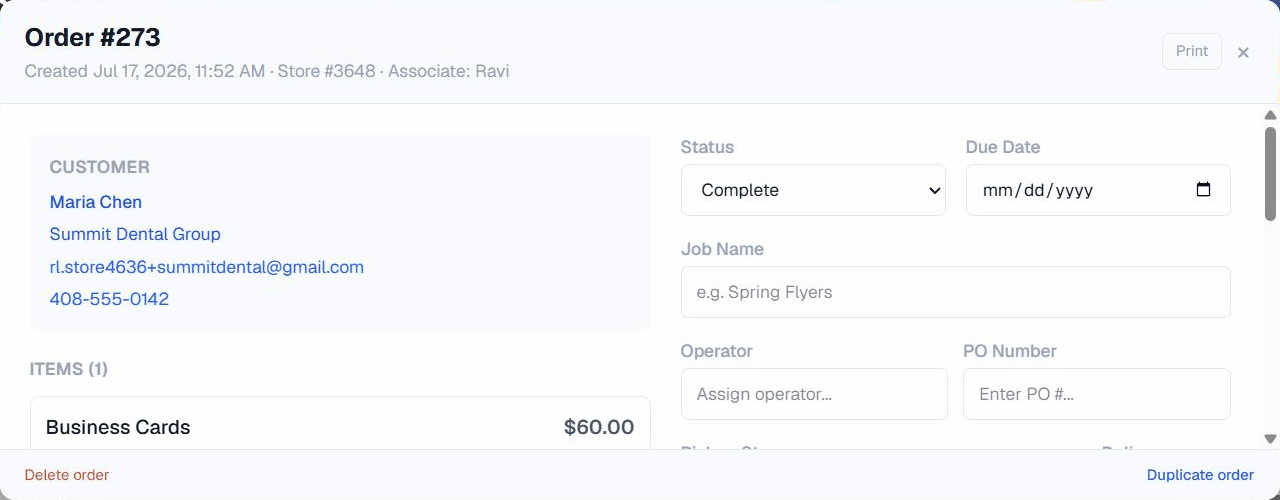
Order detail panel with line items, payments, and activity timeline
A detail panel that runs the whole jobEdit line items in place. Track per-item outsourcing with vendor and cost. Add internal comments. Duplicate the order for repeat clients. Every action lands in a full activity timeline.
Quotes the customer can act onSend a quote email and watch approve or request-changes activity come back, tracked on the order.
Invoicing through Square, printing on your letterheadSend a Square invoice, resend it, refresh its status, or print an invoice on store letterhead for the counter.
A real payment ledgerMultiple payments, deposits, refunds, and a running balance on every order. You always know what's owed, not just whether it's "paid".
Proof approval from the customer's phoneSend versioned artwork proofs to a tokenized page. The customer taps Approve or requests changes, time-stamped, no login needed.
Customer pages that close the loopTokenized quote approval that submits the job straight to production, and account statements where the customer can Pay per invoice or Pay All through Square.
Clients tabOrder history per client, one-click Reorder, an Open in CRM deep link, and a guarded delete so nobody wipes a client by accident.
Products tab for adminsPrice tiers with inline click-any-cell editing, duplicate a tier to start a new one, and bulk repricing with a percentage preview before anything changes.
Finance tab built by someone who files these reportsPOS reconciliation grouped by store with inter-store badges, unpaid invoices with a Send Statement button, a tender report, and a royalty-exclusion report with CSV export and email-per-store.
ReportsDate-range KPIs, sales by store, customer, and product, a discount report, and Excel and PDF export for all of it.
Settings you controlTax, shipping, and email configuration, plus fully editable email templates with merge fields. Your wording, not ours.
Why store owners care

This is the profit center, handled.

Watch a real order go from counter to pickup.

We'll take an order live, run it across the board, and send you the proof link. Ten minutes, no slides.

Request a demo